Preflight for ad creative
Drop the finals.
See what bounces.
Gatecheck checks every image, video and HTML5 banner in a campaign against 24 placements on Meta, TikTok, YouTube, Google and more. It tells you what will be rejected, why, and how to fix it, before the media agency does.
The problem
Every agency has the spreadsheet.
Before a campaign goes out, someone opens every file and checks it by hand: size, ratio, weight, length, codec, frame rate, loudness, safe zones, file names. Then they check that every placement in the media plan actually has a file.
It happens late, under deadline, file by file. What slips through comes back as a rejection in Ads Manager or a bounce-back from the publisher, usually the day the campaign was meant to go live.
| File | Size | Weight | Length | Audio | OK? |
|---|---|---|---|---|---|
| Reels_9x16.mp4 | ? | ? | ? | ? | ? |
| MPU_300x250.png | ? | ? | ? | ? | ? |
| Bumper_16x9_6s.mp4 | ? | ? | ? | ? | ? |
| HalfPage_300x600.jpg | ? | ? | ? | ? | ? |
| Story_9x16_v2.mp4 | ? | ? | ? | ? | ? |
| Mobile_320x50.png | ? | ? | ? | ? | ? |
What it catches
The things that bounce, found in seconds.
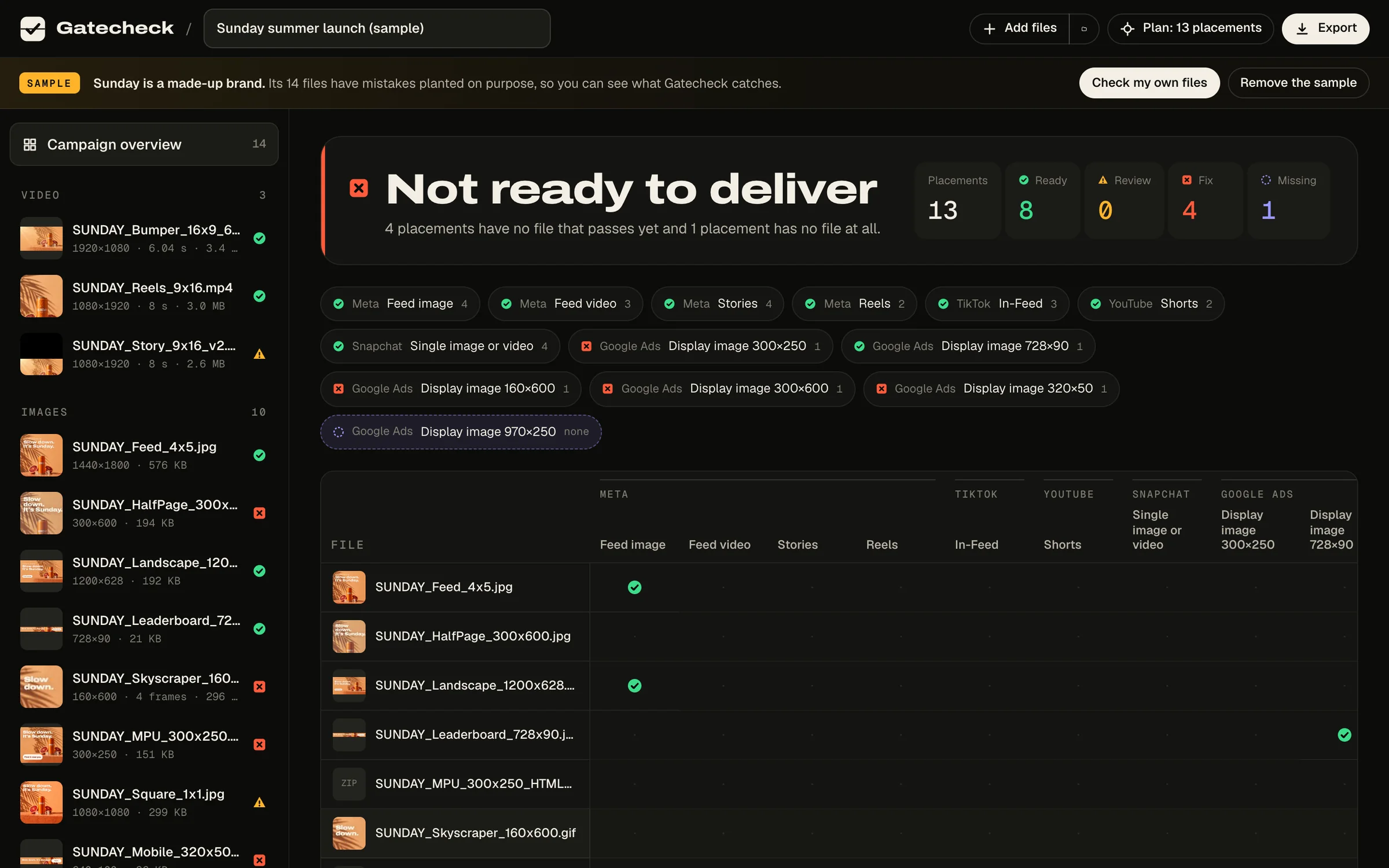
To show Gatecheck at work, we invented a brand. Sunday is a sparkling blood orange drink that does not exist. We built its 14-file campaign the way real deliveries go wrong, planted the mistakes on purpose, and ran it through the checker. Everything on this page is what it found.

Story 9:16CTA under the UI 
Story, altOff 9:16 
Feed 4:5Ready 
SquareAdobe RGB 
LandscapeReady 
Reels videoReady 
Story videoBlack bars 
6 s bumperRuns 6.04 s 
MPU 300×250151 KB 
Half pageCMYK 
Mobile 320×50Sent at 2× 
Skyscraper GIFLoops forever 
LeaderboardReady 
HTML5 MPUNo clickTag
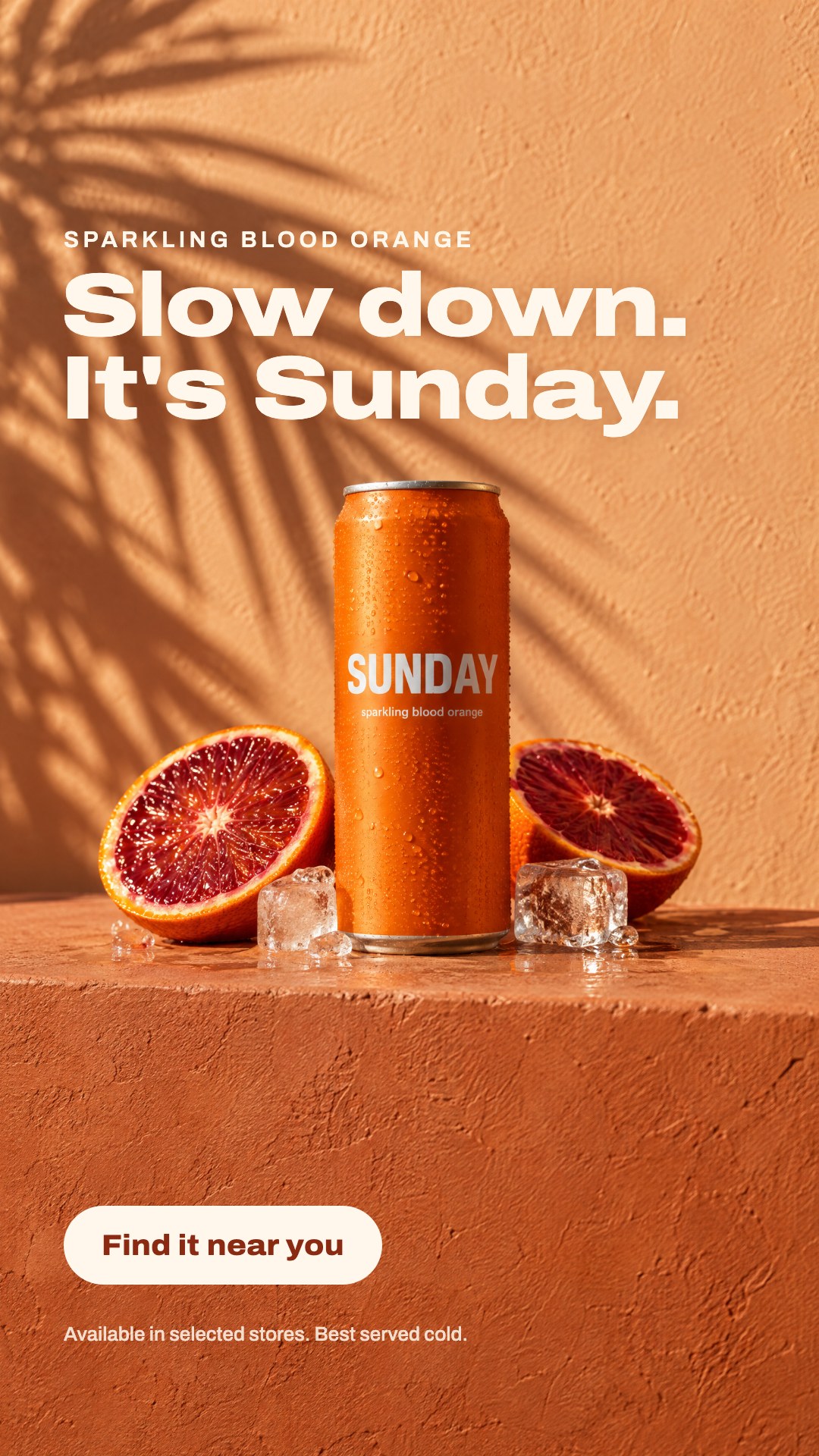
Review In Sunday's story ad, the call to action sits inside the bottom 35% that Meta reserves for its own caption and button. Every automated check passed. The overlay is what catches it.
What went wrong, and what Gatecheck did about it
- FixAn MPU at 151 KB for a 150 KB slot.Converted to a 33 KB JPG in one click, then re-checked.
- FixA half-page banner saved in CMYK.A print export mistake. Converted to sRGB in the browser.
- FixA 640 × 100 retina file for a 320 × 50 slot.Google wants the exact size. Resized automatically.
- ReviewA bumper that runs 6.04 seconds.Bumpers are capped at 6. Measured from the frame count, to the hundredth, so you can trim before Google decides.
- FixA skyscraper GIF that loops forever.Google requires animation to stop within 30 seconds; IAB guidance is 15.
- FixAn HTML5 banner with no clickTag and a hard-coded link.Clicks would go untracked in CM360 and DV360.
- ReviewA 16:9 edit dropped into a 9:16 frame.Black bars found by sampling the actual frames.
- ReviewA square exported in Adobe RGB.Colours shift when platforms strip the profile. One-click fix.
Also: loudness and true peak to ITU-R BS.1770, variable frame rate, interlacing, HDR, 10-bit exports, edit-list trims from QuickTime, EXIF rotation, transparency, missing audio, and file names ad servers reject.
How it works
The spreadsheet, built in seconds.
- 01
Drop the delivery
Files, a folder or the zip you were about to send. Gatecheck reads every file at the byte level, including multi-gigabyte masters.
- 02
Pick where it runs
Start from a preset (Meta full set, vertical everywhere, Google Display sizes, TV and CTV) or add a publisher's own spec sheet. Missing placements are flagged.
- 03
Fix, then send
Repair statics in one click. Get exact re-export settings for video. Export a branded report, a delivery sheet and a renamed package.
Private by design
Your unreleased campaign never leaves your computer.
Most creative QA tools ask you to upload finished work to their servers. Gatecheck does not have an upload step. It is a web page that works like a desktop app: your browser reads the files, a background thread measures the audio, and the report is written on your machine.
- No upload. Files are read locally and forgotten when you close the tab.
- No account. Open the page and drop.
- No tracking. No cookies, no analytics, no third-party requests. Even the fonts are served from here.
Specs with receipts
Every rule links to its source.
Platform specs change, and the cheat sheets lag behind. Each rule in Gatecheck shows where it came from and when it was last checked, so you can defend a verdict to a client or a media agency.
Browse the spec libraryGoogle Ads · HTML5
600 KB
Not the 150 KB most guides still quote. The 150 KB limit applies to static image ads.
Source: Google Ads Help, uploaded display ad specs · checked 28 Sep 2026
Pricing
Free for one file. Pro for the campaign.
Free
$0
Anyone, one file at a time
- Every check on all 24 placements
- Loudness, safe zones and black bars
- The spec library
Pro
$190 per year
One producer or editor
- Folders, zips and whole campaigns
- Delivery plans and missing placements
- One-click repairs
- Branded report, delivery sheet and package
- Custom publisher and TV specs
Team
$790 per year
An agency, up to 5 people
- Everything in Pro
- One key shared across up to 5 people
Secure checkout by Stripe. Cancel any time. 14-day money-back guarantee.
Free while in early access.
Checking a single file will stay free. Campaign tools (delivery plans, reports, packages, custom specs and repairs) are free for everyone during early access. No card and no account.
Open the checkerQuestions
Does Gatecheck upload my files?
No. Files are read by your browser on your computer. Nothing is sent anywhere, and closing the tab clears them.
Which files can it check?
JPG, PNG (including animated PNG), GIF, WebP, MP4, MOV (including ProRes masters), M4V, WebM and HTML5 zips. Drop a folder or a zip of finals and it opens it up.
How accurate is the loudness reading?
It follows ITU-R BS.1770 and EBU R128. In our test suite it matches ffmpeg's EBU R128 meter to within 0.2 LU on stereo, mono, 5.1 and 24-bit PCM audio.
Can it fix my files?
Static images, yes: compression, CMYK and wide-gamut conversion, exact resizing, rotation and transparency, all in the browser and re-checked afterwards. For video it gives exact re-export settings and a ready-made ffmpeg command.
What if a publisher has its own spec sheet?
Add it as a custom spec: size or ratio, weight, formats, length, frame rate, loudness and animation limits. It is saved in your browser and appears in your delivery plan.
Which browsers work?
Gatecheck is tested in current Chrome and Safari; Edge uses the same engine as Chrome. Every check reads the file itself, so results are the same in each. Previews depend on the codecs your browser can play (Safari plays ProRes, for example).